Never build your app around a single AI provider
Why single-provider AI apps are risky
When you’re building your own apps or services, you don't want to lock yourself into one specific provider or vendor for a critical component of your app, where you can help it.
That is especially true with AI.
For example, AI providers like ChatGPT, Claude, and Gemini can change their pricing, usage limits, model behavior, rate limits, and reliability from week to week. One month a model feels like the obvious best choice. A few weeks later, the price changes, a model gets replaced, a limit changes, or a competitor ships something better.

You also need to account for outages. If your entire app depends directly on one provider and that service goes down, the AI feature inside your app goes down with it.
That might be acceptable for a side project. It is not great for a production app where AI is part of the core user experience.
The goal is not to avoid using AI providers. The goal is to avoid letting one provider become the shape of your entire app.
AI providers change faster than normal infrastructure
Most developers already understand vendor lock-in with databases, payment processors, cloud platforms, auth providers, and analytics tools. But AI provider lock-in feels a little different because the space moves so fast.
Pricing changes. Model names change. Context windows change. Rate limits change. Output quality changes. Safety behavior changes. Streaming behavior changes. Tool calling behavior changes. Sometimes a model that worked great for one workflow suddenly becomes worse for that same workflow after an update.
This is why it is worth keeping official provider references close when you are building. OpenAI publishes API pricing and an OpenAI status page. Anthropic publishes Claude API pricing and an Anthropic status page. Google publishes Gemini API pricing and Gemini API rate limits.
Those pages are not just boring documentation. They are part of your architecture risk.
If your app only talks to one provider directly, every provider change becomes your problem immediately. If pricing goes up, you either eat the cost or rebuild. If rate limits change, your users feel it. If the provider has an outage, your feature disappears.
The adapter pattern solves the wrong kind of dependency
What you want is to implement an adapter pattern for any important service you may eventually need to swap.
That means your app should not care which AI provider is being used behind the scenes.
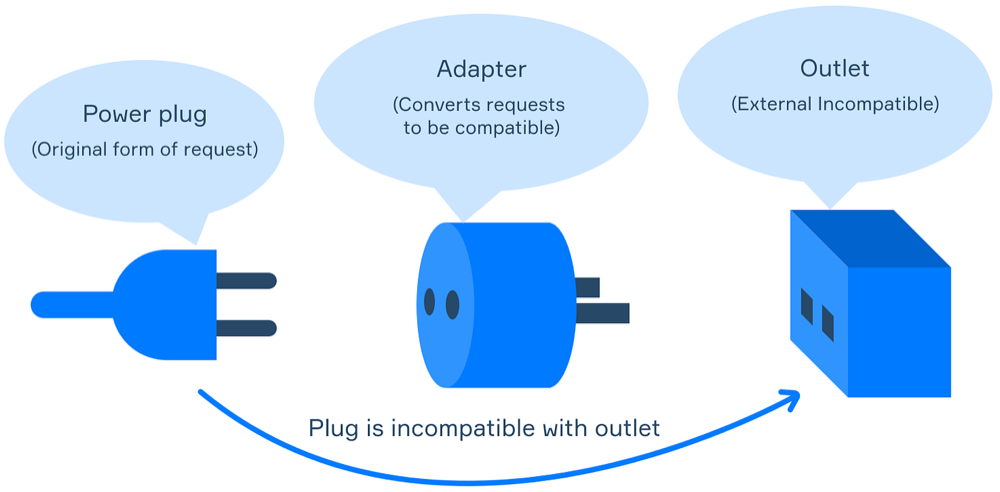
The adapter pattern is a classic software design pattern. The basic idea is simple: your app talks to a target interface, and the adapter translates that request into whatever the outside service actually expects. If you want a formal explanation, the Refactoring Guru adapter pattern guide is a good reference.
The reason this matters with AI is that every provider has a slightly different API shape.
One provider might call the input messages. Another might call it contents. One provider may stream chunks one way. Another may return usage metadata differently. Tool calling, JSON output, image input, system prompts, safety settings, and error responses can all vary.
If those details leak into your whole codebase, switching providers becomes painful.
Stop writing provider-specific app logic
Instead of creating provider-specific functions all over the app like askClaude, askChatGPT, or askPerplexity, build a common interface with general functions like generateText, askAI, summarizeText, or classifyMessage.
Then create a separate adapter for each provider you connect.
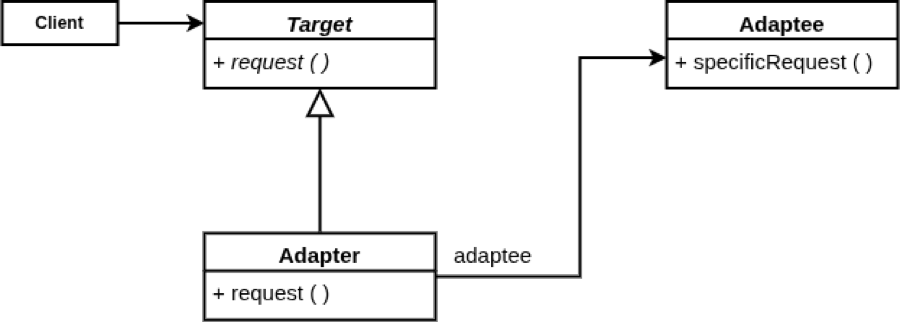
Your app should depend on your interface, not the provider’s SDK.
For example, your product code should not need to know whether a request is going to OpenAI, Anthropic, Gemini, Perplexity, or another provider. It should know that it needs text generated, a summary created, a structured JSON response returned, or a classification completed.
That is the difference between building around a feature and building around a vendor.
The wrong shape looks like this:
const answer = await askClaude(userMessage);The better shape looks more like this:
const answer = await aiClient.generateText({
  prompt: userMessage,
  useCase: "support_reply"
});
The second version gives your app one consistent contract. The provider behind that contract can change.
What the AI adapter layer should own
Your AI adapter layer does not need to be complicated at first. Start with the smallest interface your app actually needs.
For a lot of apps, that might include:
generateTextgenerateStructuredOutputsummarizeembedTextclassifymoderate
Each function should accept your app’s internal request format and return your app’s internal response format.
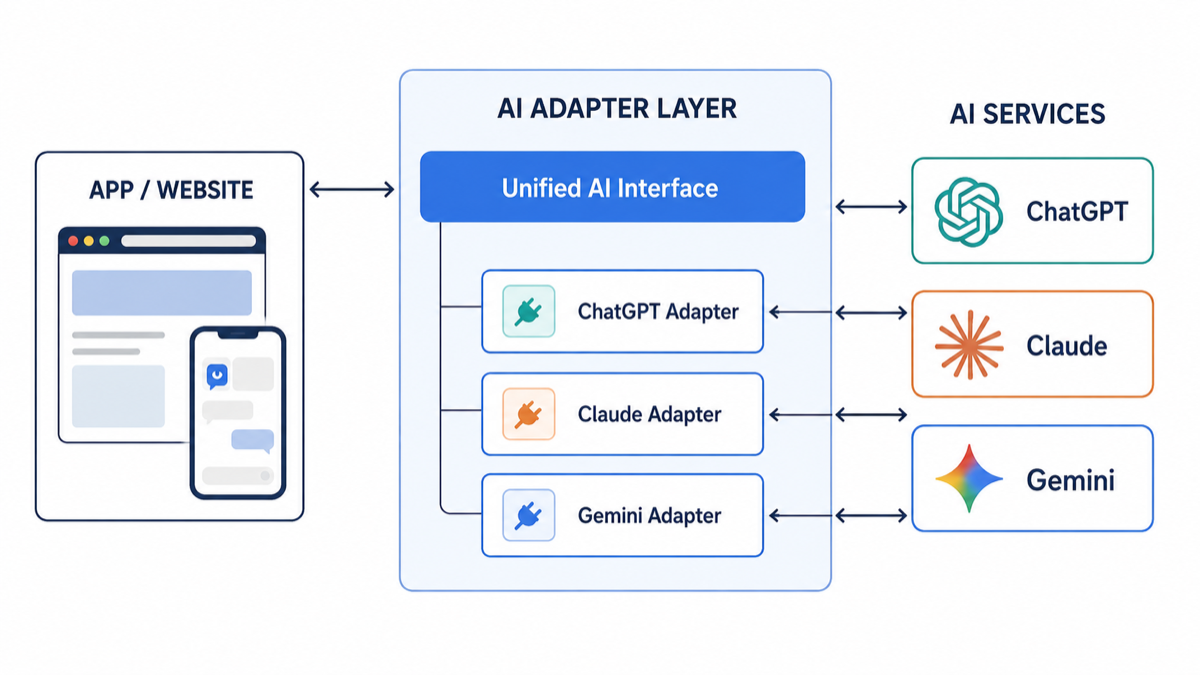
The adapter should handle provider-specific details like model names, request payloads, authentication, retries, streaming, timeouts, usage metadata, error mapping, and response normalization.
That last part matters a lot. If one provider returns an error as rate_limit_exceeded and another returns 429, your app should not have to care. Your adapter can convert both into a consistent internal error like AI_RATE_LIMITED.
Now your app can make decisions around your own stable categories instead of chasing every provider’s edge cases.
How this helps during outages
The most obvious benefit is fallback.
If Provider A is down, you can send the request to Provider B. If Provider B is too expensive for a high-volume task, you can route that task to Provider C. If one model is better at reasoning and another is cheaper for simple summaries, you can route by use case.
That does not mean every provider is perfectly interchangeable. They are not. Different models produce different output. But you can still design your system so provider switching is possible instead of impossible.
At minimum, your app can support:
- Primary provider for normal traffic
- Secondary provider for outage fallback
- Cheaper provider for low-risk background tasks
- Stronger provider for high-value reasoning tasks
- Feature flags for testing model changes
That gives you room to move.
Without an adapter, an outage becomes a panic. With an adapter, an outage becomes a routing decision.
What not to abstract too early
There is a balance here.
You do not need to create a huge enterprise abstraction before your app has users. If you are still validating the product, keep it simple. A thin wrapper around one provider is fine.
But once AI becomes important to the app, you should avoid letting provider-specific assumptions spread everywhere.
Do not over-engineer every possible future provider. Just create a boundary.
The boundary can be simple:
interface AIClient {
  generateText(input: GenerateTextInput): Promise<GenerateTextResult>;
}
Then your first adapter can be OpenAI, Anthropic, Gemini, or whichever provider makes sense today. The point is that your app has a place to put provider-specific logic later.
That is the win.
A practical implementation checklist
If I were adding this to an app today, I would start with this checklist:
- Create one internal AI client interface.
- Define request and response types that belong to your app.
- Put provider SDK calls inside adapter files only.
- Normalize errors into your own app-level error codes.
- Track usage and cost by provider, model, feature, and user flow.
- Add timeouts and retries.
- Add a fallback path for critical AI features.
- Use feature flags or config to switch providers without redeploying.
- Log enough context to debug provider behavior without storing sensitive user data carelessly.
That is not a massive architecture project. It is just respecting the boundary between your product and the vendors it depends on.
Final thoughts
Your app should not have to be rebuilt every time you switch AI providers.
If you build directly around one provider, that provider’s pricing, limits, outages, API shape, and model behavior become part of your app’s core architecture.
If you build around your own adapter layer, your app gets one consistent interface while the provider behind it can change.
That means you can fall back during an outage, move when pricing becomes too expensive, test different models, and keep your product logic clean.
Your app continues working the same way, and you do not have to rebuild it every time you switch AI providers.
Thoughts?
